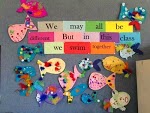
Learning is....
Planting a seed in our brain... learning to water, nurture and grow it.... so we can live on the fruit of our learning and plant more seeds.

Wednesday, 2 April 2014

Anzac Day Reading Unit - The Donkey Man

Every year I do an Anzac Day unit.  I consider that Anzac Day is one of two very important days in the history of New Zealand (the other being Waitangi Day) that forged this country.  Because I do this unit every year I need to keep it fresh for me and for the students I've had the year before.  In 2013 it wasn't really an issue as I was at a new school, but in the past I've focused exclusively on Gallipoli one year, the Western Front in France and Belgium the next, the home front another year, and then on World War II the next year.

In 2013 I decided for one reading group we would focus on this excellent picture book, The Donkey Man by Glyn Harper.

 
Glyn Harper is a history professor at Massey University, who specialises in war history.  He has written heaps of books about various wars and topics within, for both adults and children.  I really like this book because it is written from the point of view of a donkey at Gallipoli.  Children can relate to that concept to understand the place Gallipoli was.


My first session with the group was to use the front cover as a launch pad for some predicting.  I wanted my group to form a hypothesis each just using the cover.  First we talked about what a hypothesis is.  I supplied them with a black and white photocopy to make their hypotheses, which brought about some interesting responses.

 
The hypotheses the group came up with did not mention war.  In fact they thought it was going to be about a donkey on a farm!!  So then I had to show them the actual book cover.  When they saw the red cross on the bandage on the donkey's nose they had a better understanding.
 
So I gave them another go at the hypothesis (see the picture below) once they saw it in colour.  Then we talked about what a blurb on the back cover was. 
 
 
After discussing the blurb we then revisited our hypotheses to decide if they still stood up and then investigated where Gallipoli is.
 
 
I like to use maps, pictures, graphic organisers and other visual aids to give the children context as they read.  The above maps that I used were a world map (giving context to where New Zealand is in comparison to Gallipoli); a map that focuses on the general area around Turkey (give context to neighbouring countries, especially on the fact that Britain wanted access to the Black Sea so Russia had a warm water port close to Europe); a map of Turkey (to see how big Turkey is in comparison to the area being fought over); and finally the map of the Gallipoli Peninsula to see where the attacks actually happened.
  

As you can see from the above picture, I used De Bono's thinking hats to get the group thinking about how the cover of the book impacts your impression.  We learnt from starting with a black and white cover to going to a colour cover how your impression of the book changes.  So by using De Bono's yellow/benefits thinking hat we discussed how having the coloured cover was able to help with making a hypothesis more so than the black and white cover; the colour gives so much more detail.  Using the blurb also impacts on what you think about the story.
 
So before we have even started reading the text, there is a lot of discussion and prediction about the book.  We have used a lot of visual aides too, to enable an understanding of where the events in this book are taking place and why.
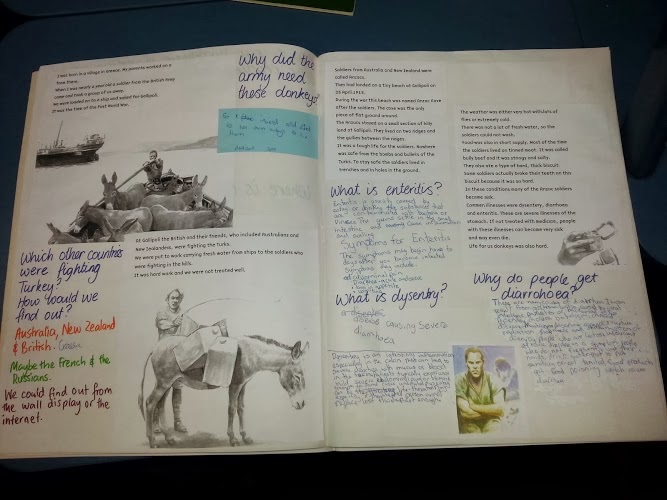
 

I did photo copy the book and glue the story into the group's modelling book.  I did this so we would be able to highlight aspects of text and to focus only on the pages that we were currently working on.  I really did not want my original text drawn all over!!  This also allowed me to ask questions pertaining to that particular piece of text. 
 
As you can see above, this first lot of text talked about some of the more serious adverse conditions the soldiers faced at Gallipoli apart from bullets - disease.  So I sent the kids off with the dictionary, i-pads and/or computers to do some research into what dysentery and enteritis is, and how someone gets diarrhoea.  This was a fairly hefty bit of research. 
 
You cansee that I use the modelling books to record the children's thoughts in a variety of ways.  Sometimes I have done some writing; sometimes they have done some writing independently on bits of paper and glued them in; and they also do some collaborative writing directly into the book.
 
 
I really wanted the group to understand what life was like in the trenches.  And luckily there was a news article on the Stuff website of recent research into the diet of the soldiers at Gallipoli, which Glyn Harper, the author of The Donkey Man, was party to.  So I interrupted our reading of The Donkey Man to read the article Diet did Anzacs no favours.  This brought in a lot of new language that we had to investigate as we read.  I then sent them off to find the key parts of the Gallipoli soldier's rations in picture form from the internet.  They had to print these out and glue them in the modelling book and label them.
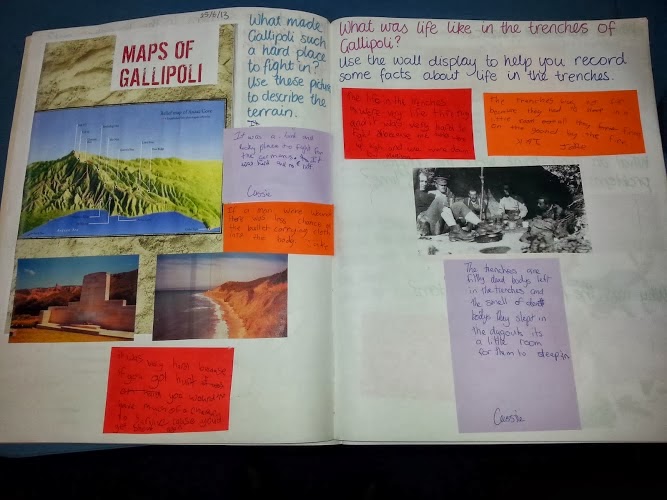


We then looked at other aspects that made Gallipoli challenging to the soldiers, such as the landscape, dead bodies that couldn't be removed, where they slept, flies, lice, fleas, weather.....  I used maps from other books, such as Gallipoli Reckless Valour by Nicolas Brasch, and photos from my own trip to Gallipoli for the Anzac Day commemoration in 2001.  I had set up the wall display (see below) to also help.  It had further photos from my trip to Gallipoli as well as pictures and text from selected books on trench life.
 
 
You can also see that my display also has references to the battlefields of France and Belguim.  I've also included a photo of my great grandfather who fought at Passchendaele and statistics from World War 1 which I felt were relevant.
 
Then it was time for a bit of a recap of what we knew before delving into the role of the donkeys at Gallipoli.
 
 
This next piece of text enabled us to consider some things that were explicitly said in the text and some things that we had to make educated assumptions about.  A good way of bringing those inferential skills into the lesson.
 
 
Some prediction skills came into this part of the text.  This is the good reason for photocopying the book.  You can control how far into the text the students get, to prevent them from wrecking all those wonderful skills like prediction and making hypotheses that you want to teach them.


On this page I was focusing on two main things:
  • using bullet points to list facts.
  • using inference to come to a conclusion about something that is not fully explained in the text.
The inference also meant they had to use what they had learnt from other sources such as photographs, videos we had watched, other text sources as well as this book.
 
 
Here I introduced the story of Simpson Kirkpatrick, from the book Gallipoli: Reckless Valour and we also had the poster on the wall display.  The students went away and found out some additional information at Simpson and created their own fact file about this legendary person from Gallipoli.
 
 
On this page there was a fair bit of inference in answering the questions and also using knowledge gleaned from other sources (other texts, videos, pictures).  The children are having to draw conclusions of their own, because this text is not explicitly telling the reader why these things are happening.
 
 
Finally the book has a factual bio about Richard Henderson to tell us what happened to him after Gallipoli.  I also told the group about who the author was, what he also did apart from writing this book.  I asked them to write questions for Glyn Harper.
 
I wanted to email the questions to Glyn, but we just ran out of time due to interruptions.  Another group I was working with did send him questions in relation to the Stuff article about the rations, and he was able to help us out with some answers.  It is really valuable for the students to be able to communicate with the authors.
 
We also verbally went back to our initial hypotheses about the book and discussed how accurate or different they were from the book now we had read it.
 
This was a great book to read with an able group of readers.  I would have preferred we hadn't had so many interruptions so we got through the book quicker, but we did take the opportunity to bring in other sources to give context to the time and place and events that we were reading about and this enhanced the learning for the students.

Friday, 28 March 2014

The Classroom Environment - what makes a class attractive?

After school today I thought I'd take a quick look at my blogs.  First though I took a glance through my blog roll and a post by Bruce Hammond caught my eye: New School Year - what has been achieved?  So I had a bit of a read. 
 
Bruce apparently had visited some schools towards the end of Week 6 and he said he was somewhat disappointed at the classroom displays.  This is what he said he had wanted to see:
 
I would've liked to have seen:

Evidence of a simple environmental study - based on students’ questions, valuing their ‘prior ideas’ including some observational drawings, language work and creative art. To ensure quality teachers need to teach simple presentation techniques/’scaffolds’.

I would've liked to have seen the above work well displayed with appropriate captions.

I would've also liked to have seen some focused personal writing about something the students’’ had experienced during their holidays. I would have liked to have seen these displayed well along with portraits or drawing featuring some aspect of the experience. To ensure students achieve best results teachers need to teach their students some simple presentation skills.
 
At the bottom of his post, Bruce had some practical links to unit ideas, lesson plans, ideas for the classroom environment and wall displays.
 
So it got me thinking, would Bruce be impressed with my classroom? 
 
Granted, I've made a big effort to have my class looking great by the end of Week 7 for three reasons:
  • I want the children to know that their work and learning is valued.
  • I want the parents to know their children are learning and to celebrate it.
  • We had the school centenary last weekend and I wanted to impress all the visitors (I got great responses from past pupils, teachers and families - one lady was even taking photos of the children's work around the room!).
So here are some photos from around my room.  I kind of walked around in a clockwise direction from my desk (but avoided photographing that bombsite!).
 
Firstly, this is the display of the first unit we did this year.  It's average by my standards.  The Vocab Expander was a language activity for some of the more able in my class.  The flags were from earlier in the term when we made up our own flag designs in response to John Key's initiation of the change the flag debate.  Below those are some pictures from a social studies resource about the Treaty.  And the projects to the right are two of four research projects by four students.


We have been doing geometry shapes and objects for maths.  The children used these shapes to help them describe the attributes of each shape.  They had to include how many sides and corners the shape had, and if the sides were straight, curved or continuous.  Each group had three students (one had four), and as a group they recorded the attributes, which is what those little cards dangling from each shape are.  Of course, despite having the correct spelling for most words needed on the board, some of the spelling is rather creative.


And here are more of the flags hanging on the wire across the back of the room.


Bruce wanted to see writing about the children's holidays.  Well here it is!!  No pictures sorry Bruce!!  And I must confess that I typed up 13/16 stories.  But the kids did get to choose the fonts, colours and borders.  It was purely a time thing.


Brendon McCullum made history with his 302 runs, and it was a great opportunity to write stories about it from Brendon's point of view.  The language that some of the children used to describe how Brendon may have felt inside of himself was great.  You may also notice that one story in the picture above and in the pictures below are actually photos.  One student has Downs Syndrome, so we used pictures from his family holiday, or photos of him playing cricket or things he likes doing or creating the same kind of picture so he has a 'story' too.


These are some of my resources for Te Reo Maori that I have made myself over the years.


During the summer holidays I saw this awesome photo on a Facebook feed I follow and I pinned it in
Pinterest as I thought it would be a great first week art activity.  I love it.  Just something simple, yet effective.

I wanted to reinforce the idea that we are all different and it's ok not to be the same.  This activity was also very good for including my special needs student and for the new Year 4s who need to learn about presentation.


I love calendars because of the amazing photography.  We were given a box of calendars on the Waikato that were from 2012 last year.  So I gave each child a calendar and asked them to choose the picture that spoke to them.  I really pushed using adjectives and similes (because it's the "done thing" to do now - and I didn't know what they were until I'd been teaching a few years and my stories at school were good!).  Yeah, I confess that I typed 11/14 stories.... but the kids choose the colours, fonts and borders!!


From a poem we were reading we got on the simile bandwagon.  For a change I got the kids to write them out and we kept the 'design' simple - go over the writing in felt, colour in the background with jovis or coloured pencils.


Here are the Bio Poems that I blogged about the other week.  I'm still so in love with them!!  I think it is the contrast of the black and white photo and text against the coloured background.  This time the kids did the typing.  However, I confess I printed out the photos.  The rest is all kid labour.


These pictures were created by tracing around 2-D shapes and then colouring them in.  Then I got them to write about what shapes they used to make different aspects of the picture.  Not the most exciting writing, but I have some kids that still struggle to match the name of the shape with the shape - not good in a class ranging from Year 4-8.


Ok, here is the commercial stuff - maps and flags.  We refer to the maps a lot.  I want kids to know where places are in New Zealand and the rest of the world.  It was something my teacher was big on when I was a kid, and I'm still grateful for it now.  I also think that it is important that they can recognise flags of different countries.  A bit of 'useless' general knowledge never hurt anyone, but might save them some embarrassment (or even their lives) if/when they do an OE.


The Thinking Hats by DeBono.  I refer to these a lot with our critical thinking.  Also you can see some Te Reo Maori resources I purchased from a local group as their fundraiser a few years ago.  And yes, that is a whiteboard beside an ActivBoard.


The big flower, bees and poppies were actually made last year, but I love them, so they are staying until a replacement display is made.  Yep, there is the commercialised literacy stuff on the walls for the children to refer to.  And that is my flag I bought to take to All Black games on my OE - I like to have it displayed as a reminder that my forebears fought under that flag for New Zealand.


And this is the next step on our geometry journey.  After demonstrating and teaching each child how to draw 3-D objects as you can see from photos of the kids books above of their efforts (love doing this on the ActivBoard), we then moved on to creating them with straws (below).  The next step will be to make the objects from nets.  They will be displayed from coat hangers hanging on more wire and will also have cards with the attributes of each object described.


So that is a trip around my classroom at the end of Week 8.  I hope you enjoyed it.  Maybe there is something you can take away from it.  And if you have any tips, they will be gratefully received.

Tuesday, 25 March 2014

Educamp Rotovegas 22 February 2014

On Saturday 22 February I attended Educamp Rotovegas at Mokoia Intermediate in Rotorua.

If you haven't been to an Educamp before, this is what they are all about:

A bunch of teachers converge on a school on a Saturday, at no cost to anyone, and they share their knowledge.  It is based on the unconference format - this means that it is not based on a rigid format and timetable where you have to be in a certain workshop at a certain time.  We start the day with a smackdown, which means anyone who wants to make a two minute presentation about something that excites them, adds it to a Google Doc and speaks to it.  This is the link to the Google Doc.  We also put some post-its on the wall with things we are able to share and things we want to know about on it.  As a result of these post-its, we break into groups during the afternoon to discuss specific topics.

Coders are today's rockstars  -  @mrs_hyde (I'm using Twitter handles here to say who was presenting) spoke about coding being an important skill to introduce to our learners.  Coding teachesWhat most schools don't teach is a video with a lot of those people who have been involved in founding and developing those icon ICT companies, such as Microsoft and Twitter and the like, talking about what coding will help learners with.  One that I can recommend you start with is Scratch, based on the Logo program we tinkered as kids with back in the 80s.  It's been redesigned with avatars and an exciting new "lego" building code.  You link the coding blocks together like "lego" to build games and stories or whatever.
learners about thinking. 

Kidsedchatnz  -  @Juliet_Revell spoke about Kidsedchatnz.  This happens at 2 o'clock each Thursday afternoon on Twitter.  Participating children/classes will need a Twitter account.  The topics are predetermined by a group of teachers at the beginning of each term so that the children can come somewhat prepared.  The list of topics can be found at the Kidsedchatnz blog.  To participate, contact @PalmyTeacher to register your class.


Tweetdeck  -  @mrs_hyde loves Twitter.  She calls it the best PLD, her online staffroom.  And I have to agree.  I've met so many amazing teachers through Twitter (and consequently Educamps) and been exposed to so many ideas for the classroom and ICT than I would have been by any other means.  But Twitter is a fast moving tool.  So @Mrs_Hyde introduced us to Tweetdeck is a tool so that can be personalised so you can see all the streams of your different interests, e.g. you can have one stream showing tweets automatically updating, another with notifications, another with a particular interest you have such as teachers from New Zealand.  I've been using it since when I'm on my computer and it makes things so much easier to follow when you get notifications.

TeachMeetNZ  - presented by @1MvdS for @vanschaijik (who is the person to contact for help on this), TeachMeetNZ is a virtual presentation place for teachers to share what is happening in their classroom.  It's presented as a nano slide presentation of a total of three minutes (or 15 seconds per slide).  The next presentations will be screened on Saturday 22 March during the Festival of Education.  @

#edchatNZ  -  @MissDtheteacher spoke to this topic.  #edchatNZ was developed so other Kiwi teachers (or interested parties) could find your NZ education related chat; so NZ educators can share their educational knowledge.  Once a fortnight on Thursday night we have a topic and a big discussion on Twitter.  Every comment during the discussion needs to have the #edchatNZ hash tag attached to stay visible in the feed and to allow others who couldn't/didn't participate an opportunity to dip in.  It is a great way to share, discuss, collaborate, innovate, debate.... I know because I have participated.

Blogs in specialist classes  - presented by @mrs_hyde, who this year has become a food technology teacher.  She has decided to use a blog to provide support to students, get feedback from students, support other teachers and present information about the specialist subject.

Snapchat - presented by @mrs_hyde, she talked about how great this app on your smart phone is for connecting with the young ones who will no longer communicate with you by text message, tweeting, Facebook or email - so ideal for parents.  Pictures and videos only last 10 seconds and can only be sent to people with the Snapchat app.  This does have issues as a result, mainly the potential for this app to be used as a tool to cyber bully.  Consequently it is important to push being a good cyber citizen.


EdShelf  -  presented by @AnneSturgess, Edshelf is a discovery engine of websites, mobile apps, desktop programs, and electronic products for teaching and learning.  It can be used to collate a collection of apps you use for a particular purpose.  So you can end up with a board of the apps for inquiry learning for example.  You can also print out QR codes.


Minecraft - presented by @mrs_hyde and @kasseylee11, who set up a Minecraft server at their school, it has improved student engagement, and has created literacy and numeracy learning opportunities - one class created an entire city described in a book and made movies to bring to life the end of the book.  Later in the day we had a Minecraft workshop and @kasseylee11 showed us the resources she had gotten off a website called Teachers Pay Teachers with Minecraft ideas for teachers and challenges for students.  It was my first attempt at Minecraft and I was rather pathetic.  All I achieved was digging holes, destroying trees and killing pigs!!

Explain Everything - presented by @steve_katene, Explain Everything is a unique interactive whiteboard and screencasting tool  used by over 900.000 students and educators. 

Gamification - presented by @BeLchick1, from the perspective of a mother as well as a teacher, what does gamification do for student engagement?

Google Docs - presented by @mrehu, he talked about how Google Docs are great for collaboration.  He explained how his school used Google Docs like e-hui, keeping all people informed and able to contribute regardless of who you are on staff.

Apps4Inquiry - presented @jkellow, Apps4Inquiry has apps that support inquiry-based learning for students.  This page looks at Android and iPad apps which are useful in planning an inquiry.  The apps on this site are free (when last looked) unless stated otherwise. Any prices are in NZ$ and were correct when the website was set up.  Resources4Inquiry was also highlighted with all the steps of the inquiry heading up useful web tools and apps for each stage.


Daily 5 - presented by @CaroBush who is a leading light in the world of Daily 5 in New Zealand.  Just quietly, she did not teach guided reading last year as such after reading The Book Whisperer and Reading in the Wild by Donalyn Miller (@donalynbooks), and all the children in the class went up 2 year levels, and those children below the standard met the standard.  Caro simply let the kids read what they wanted.  This is a link to Caro's Prezi about Daily 5.


Storify - presented by @mrs_hyde, Storify can gather all the goodness and notes from Twitter about a topic/conference/meeting and storify it.  It is free to use and can be embedded into a blog.  Below is my first attempt at Storifying!!


Quadblogging Aotearoa - presented by @barbs1, she talked about how lots of classes have blogs, but struggle to find an audience.  There is an international group of Quadbloggers, but schools in New Quadblogging Aotearoa organisation for our own school terms.  And some teachers got together and set it up under the Virtual Learning Network umbrella.  Any class can join and the team will group together four classes to communicate and blog with each other.
Zealand really needed their own

VLN - The Virtual Learning Network is one stop help desk, by NZ teachrs for NZ teachrs, to find help and ask questions and discuss.  It is an interactive resource provided by the Ministry of Education for all New Zealand educators.

Snapguide -  presented by @leighhynes, Snapguide makes a set of instructions using text, photos and videos to embed in your blog, wiki or other learning management systems.  It gives a set of instructions to students to do something.  There are five slides in a Snapguide.  You can add text, photos and videos.  It is best for giving simple instructions and can be created from any device.  Here is a Snapguidefor making a Snapguide!!


Bookmarking - presented by @leighhynes, Leigh explained how she organises her bookmarking in Google Drive.  She invited people to make a copy (not to alter her original) and create their own. ' Go to Leigh's Google Drive to see it in action.

3-D Printing - @onemouse brought along his 3-D printer and demonstrated this amazing machine during the afternoon.  I have to say I was originally sceptical about 3-D printing, especially after Maurice Williamson's hysterical rantings about printing plastic guns that will get through airport security.  I also really had no idea about how this technology really worked.  I had visualised ink on paper.  But as you can see from the photos I took below, it doesn't involve paper at all.  This baby was printing using plastic!!!


Hemmingway App - presented by @onemouse, Hemmingway App is an app that helps a writer improve their writing by highlighting sections of the text that may need reworking.

 @gigakidsnz  -  Brian Jennings in Napier has created @gigakidsnz, an learning resource for Y3-8 for anyone in NZ.  Great if you have got Dashboard so each kid can have their own email address, they have their own avatar, and it is like a game, and you can print out with a 3D printer.  It talks about your town and what is in your town.  If you can fit it into a context to make it work for you.


IUgo  -  presented by myself (@melulater) and @pennstaro, iUgo comes from Essential Resources and is an online planning tool with absolutely everything from the New Zealand Curriculum.  It does long term plans, unit plans, weekly plans and daily plans and you can link them all to each other.  You can get a month free to evaluate it, then the twelve month subscription kicks in.  You can join as an individual and be the only one to have access unless you give someone else your password, or your team or school can join and have shared access to each other's planning. 
Google Summit - @allanahk talked about the upcoming Google Summit towards the end of April at Albany.  The details are in the picture below and go to this link for more information.


Flick - @allanahk talked about how Flick can work on any platform and you can move a video and pictures from any device easily.  As the website says: It’s hassle free! Place photos, notes, documents and contacts onto your Flicktop and flick to any other device running the app. The built-in Flicktop provides a safe layer where files are easily transferred with a simple flick gesture. Once the file lands on your Flicktop you can then decide whether to save or delete it.


Chrome Apps - there is a Google App called Video Not.es that will allow you to play and pause and write notes about a You Tube clip and save it all in your Google Drive.  To download this app, and it has to be installed to use, click here.  Here is the blurb from the site:
Have you ever been struggling to take notes while watching videos? Not anymore!
VideoNotes, developed by UniShared (www.unishared.com), currently supports Youtube and Coursera videos and works best for the last versions of Chrome, Firefox, IE and Safari.
It enables you to:
- Watch videos and take notes at the same time, on the same screen
- Keep the same shortcuts to play/pause your video while writing notes
- Automatically synchronize your notes and video. Just click on a line of your notes to jump to the related part of the video.
Everything is automatically stored in your Google Drive, to access them everywhere.


EduCampNZ Community set up in Google+ - EduCampNZ now has a community on Google+ where you can go hang out and you can get to it from this link.  There is a getting started link to be able to explore many of the wonderful ways Google+ can be used.

Edmodo  - presented by @CaroBush, Edmodo is like Facebook for kids.  The kids don't need an email account, as it is all set up by the teacher.  They can log in with an unique code and can invite their parents.  You, as the controller, can lock it.  You can decide who sees what in it. 


ConnectED and Eduignite  - ConnectED is based in Hamilton and is a large cluster of schools within Hamilton and from the wider Waikato, but now Rotorua and Taupo are beginning their own cluster.  Its goals are as follows: To foster and establish a wide community of practice further developing a culture of improving learning environments for the region's students. To facilitate ICT initiatives that create regional capacity and are aligned with the expressed needs of the community. For educators within the region to feel more connected with each other.
Eduignite comes under the Emerging Leaders NZ umbrella.  This is the blurb:
What is ignite? Ignite is an event in over 100 cities worldwide. At the events Ignite presenters share their personal and professional passions, using 20 slides that auto-advance every 15 seconds for a total of just five minutes.
The rules:
  • Drinks and nibbles are always provided, and anyone is welcome
  • Attendance at your first Ignite evening is ‘no strings attached’
  • Attendance at your second Ignite Evening requires you to do one of two things: i) bring a friend, or ii) present an Ignite talk.
All EduIgnite sessions are 6:00pm for a 6:30pm start.

And that was a very full on day at Mokoia Intermediate, but I found out about a lot of new things, found out more about stuff I knew little about, filled in some missing gaps on things I knew a bit more about, and caught up with some wonderful educators from all over.  Thanks @mrs_hyde for being a great host.